
Monthly
Monthly license11.89 €
Including 19% VAT per person / month
€9.99 net + €1.90 VAT
- All Project Control features
- One activated PC
- Individual approval
For technical projects. For a clear overview.
Turn open issues into a clear action log: assign owners and due dates, connect work packages in a weekly Gantt chart, and share focused PDF reports. One Windows app for your project reviews.
Explore the included demo project. Try it for 14 days after individual approval.
The trial does not automatically become a paid subscription.
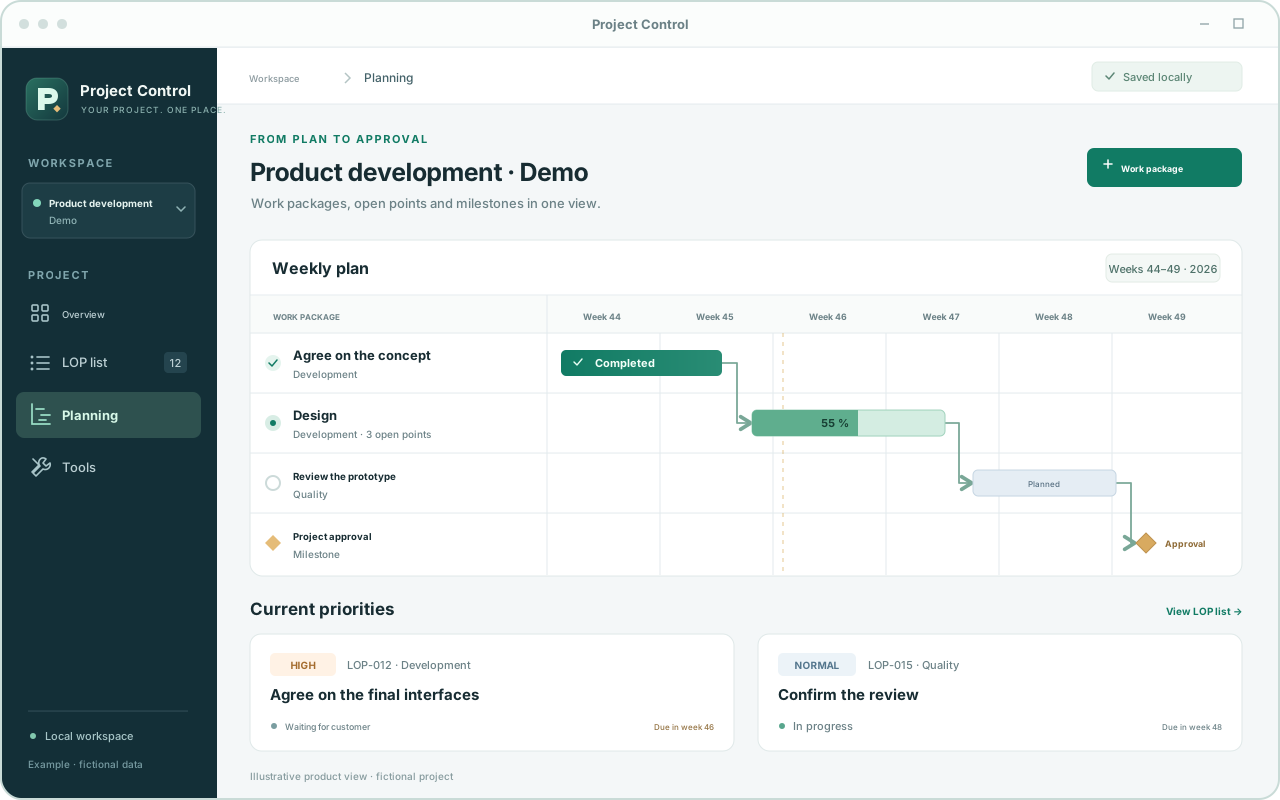
From an open question to a milestone
A project develops on several fronts at once. Your tasks, dates and technical questions belong together.
Record what still needs clarification, who is responsible and when an answer is due. Images and change history stay with the LOP item.
Owner: project management
Waiting for customer · Week 46
Plan by calendar week. Move tasks, make bars longer or shorter, and draw dependencies directly in the Gantt chart. Conflicting dates appear as red connections.
Understand dates. Recognize dependencies.
Prepare a complete project overview or export exactly the LOP items you have filtered. For example, every question still waiting for the customer.
Sample project · Filter: waiting for customer
Useful everyday tools included
TG4 analysis, geometry and weight calculators, and the scale and unit calculator support your technical work. Add their results directly to LOP items.
Define your own units and add your own HTML tools to keep everyday calculations in the same workspace.
Your tool. Your plan.
A personal license for one activated PC. Choose a monthly or annual plan with that initial term.
11.89 €
Including 19% VAT per person / month
€9.99 net + €1.90 VAT
129.71 €
Including 19% VAT per person / year
€109.00 net + €20.71 VAT
Example prices for Germany with 19% VAT. If different tax rules apply, the price is confirmed before the contract is concluded. Businesses can manage multiple personal licenses through one central customer contact.
Submitting a request in the app is not a purchase. A paid contract is concluded only when you expressly accept an individual offer. Invoices and payments are handled as agreed; the app does not collect payments automatically.
Renewal and cancellation: for private customers, the contract continues indefinitely after the first month or year and can then be canceled at any time with four weeks' notice. To end at the close of the initial term, notice must be received at least four weeks beforehand. Business contracts renew for the booked month or year unless notice is received at least four weeks before the relevant term ends. For private customers, a partial billing period after the initial term is calculated by the day, and unused prepaid amounts are refunded. Terms and examples (German). Send cancellation notices to pr@expert3dservices.com.
Try it first. Then decide.
Try Project Control for 14 days. The trial starts with the first activation after individual approval.
Install Project Control on your Windows PC.
Under “License & devices” in the app, enter your name and email address and choose the trial license.
Confirm your email address. After individual approval, the app activates automatically.
Your project data stays in your own storage. After the license ends, you can still read and export it.
Questions? Get in touch ↗Good to know
Here are the key answers before you get started.
The action list (LOP) records open questions, decisions and actions with owners, statuses and due dates. The Gantt chart shows the schedule of work packages, dependencies and milestones. In Project Control, an action item can be assigned to a work package. The item’s due date and the work package’s end date remain separate fields.
Filter the action list, for example by “Waiting for customer”, then choose the filtered LOP PDF export. The export uses your current selection and sort order. The complete project report includes only open action items; completed or cancelled items can be included separately through the filtered LOP export when needed.
Yes. Images and documents stay attached to the relevant action item. PDF files and PowerPoint files in PPT or PPTX format can be viewed directly in the Windows app. The slide viewer displays static slides; animations and embedded videos are not played. You can browse the images of one item using the gallery arrows.
People who coordinate technical projects and want to work with open points, dates and calculations in one place, for example in design, development or project management.
It enables the app's features for 14 days from the first activation. Trials are approved individually. Request one in the app and confirm your email address. The trial does not automatically become a paid subscription.
Select Private customer or Business and a monthly or annual license in the app. Enter your billing address; business customers also provide their position in the company. You receive an individual offer stating the price, start date, initial term and renewal rules. Only your express acceptance creates the paid contract. The app does not collect payments. A trial request does not require a billing address. Company packages use a central billing contact and individual employee email addresses.
You can give notice by email to pr@expert3dservices.com with a four-week notice period. After the initial term, private customers are not bound for another full month or year. Business contracts renew for the booked period if the notice deadline passes. The terms (German) explain dates and proportional consumer billing. Trial licenses remain free and do not automatically become paid licenses.
A personal license permits one activated PC at a time. Release the previous PC under “License & devices” or through the provider before switching. The license does not synchronize projects; use backup and restore to transfer them. Offline authorizations already issued remain valid at most until their original expiry: no more than seven days after the last issue and never beyond the license end.
You choose the data folder: locally or on a network drive. When working together, the app detects intervening changes and prevents overwriting a newer version. Synchronized OneDrive and SharePoint folders open for shared reading; create a local working copy to edit. Project contents are not sent to the license service. A sample project introduces the features on first launch.
A connection is needed to request, activate and verify your license. After a successful check, you can use the app offline for up to seven days, but never beyond the license end.
From version 0.3.0, the app checks for newly published versions at startup and then daily. After you confirm, it downloads the update and starts installation once the save and shutdown checks are complete.
Your project data is preserved. A valid license is required to make further changes. Existing content remains available to read, export or back up.
Project Control is a Windows desktop app for x64 PCs. The interface is available in German, English and Spanish. The installer includes the .NET runtime and installs WebView2 Runtime if it is missing.